

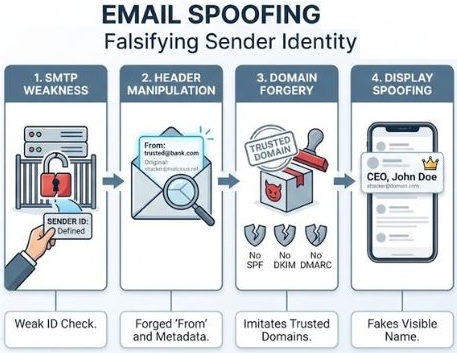
Email Header Forging (Email Spoofing)
Header forging is a deceptive technique in cybersecurity where a malicious actor alters the metadata or technical routing information in digital communications (like emails or network packets) to make the message appear as though it came from a trusted source, effectively bypassing basic security checks. The term generally applies to Email Header Forging (also known as spoofing) and HTTP/Network Header Forging, each targeting different layers of digital infrastructure.
Another explanation angle is, that email spoofing is a cyberattack technique where the sender address of an email is altered to make the message appear as though it originated from a trusted source. Attackers manipulate the core technical fields of an email to trick recipients into trusting the message. This trust is then exploited to steal sensitive information, distribute malware, or conduct financial fraud.
Simple Mail Transfer Protocol (SMTP) was originally designed without built-in sender authentication. At the time any outgoing mail server could easily by manipulated to specify a forged “From” address.
(1) Email Header Forging (Email Spoofing):
This is the most common type. Every email contains “headers” that detail its transmission path, including who it’s from, who it’s to, the date, and the mail servers it passed through.
How it works:
Because original email protocols (like SMTP) do not inherently authenticate the sender, a spammer or hacker can easily type a fake name and email address into the From: or Reply-To: headers.
The Goal:
It tricks the recipient into trusting the email, which is often used in phishing campaigns to steal login credentials, distribute malware, or trick employees into transferring funds.
Prevention:
Organizations use a trio of protocols to prevent this: SPF (Sender Policy Framework), DKIM (DomainKeys Identified Mail), and DMARC. These verify that the server sending the email is actually authorized to do so by the real domain owner.
(2) HTTP Header Forging:
This occurs when an attacker manipulates the headers sent between a web browser (the client) and a web server during a standard browsing session.
How it works:
Attackers use specialized tools or browser extensions to intercept and modify the HTTP requests their computer sends.
The Goal:
It’s all about bypassing restrictions. They might forge the X-Forwarded-For (XFF) header to lie about their IP address, tricking a website into thinking they are accessing it from an approved location or network.
Privilege Escalation:
Forging a referrer header to convince a web application that the user was redirected from an authorized page.
Stealing Sessions:
Manipulating Cookie or User-Agent headers to hijack someone else’s active session.
Prevention:
Web application firewalls (WAFs) and strict server-side validation are used to check that incoming headers conform to expected formats and contain valid cryptographic tokens.
Common Types of Email Spoofing
Display Name Spoofing:
Changing only the visible contact’s name for example “CEO’s Name”) while leaving the underlying email address completely unrelated.
Domain Spoofing:
Forging the exact domain name of a legitimate company directly in the email header fields.
Lookalike Domains:
Registering a completely separate domain that relies on subtle typos, such as using micros0ft.com instead of microsoft.com.
Spoofing vs. Phishing vs. BEC
Frequently used together but represent different components of an attack:
(1) Email Spoofing
Is the technical tactic of masking a sender’s true identity.
(2) Phishing
Is the broader attack category that uses social engineering to steal data or credentials. It frequently uses spoofing to look believable.
(3) Business Email Compromise (BEC)
Is a targeted corporate campaign aiming for financial fraud, which may use spoofing or rely on actual hacked accounts.
How to Spot a Spoofed Email
Inspect the Full Header:
Look past the display name and examine the actual sender address and Reply-To fields for mismatches.
Check for Forced Urgency:
Watch for high-pressure language demanding immediate money transfers, password resets, or information disclosure.
Analyze Web Links:
Hover over hyperlinks without clicking them to check if the true destination URL matches the official website.
Verify Externally:
If an email from a colleague or bank seems unusual, confirm its legitimacy through a known phone number or separate communication channel.
Strategic Technical Defenses
Organizations deploy three core authentication records within their DNS settings to prevent attackers from abusing their domain names:
(1) SPF (Sender Policy Framework)
Lists all authorized IP addresses allowed to send email from the domain.
(2) DKIM (Domain Keys Identified Mail)
Attaches a cryptographic signature to verify the message wasn’t altered in transit.
(3) DMARC (Domain-based Message Authentication)
Tells receiving servers how to handle emails that fail SPF or DKIM checks.


