

Creating Email Filtering Rules:
Email filtering is an effective way of managing your incoming email. By applying filtering rules, incoming email is automatically processed according to your own predefined criteria. Mail can be moved, deleted, replied to, flagged, etc.
Examples:
* Send mail from a specified address to a folder
* Send mail with a specified subject to a folder
* Send an autoreply to incoming mail
* Delete mails which contain certain words
Create email filtering rules via Webmail:
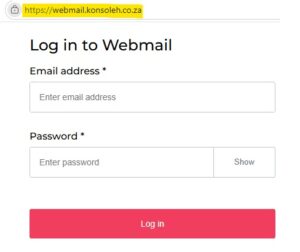
* Browse to http://webmail.konsoleh.co.za
* Log in with your full email address and email password.
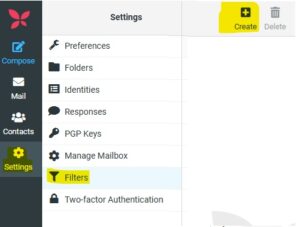
* Select Settings in the left-hand list of options.
* Select Filters from the menu on the left.
* Create the relevant filter.
* Give the filter a name.
* Choose the incoming mail criteria using the dropdown arrows.
* Choose the actions that should be executed using the dropdown arrows.
* Select the Save button.
These filtering rules are applied directly to your mailbox, and these filters are always active and will apply to all devices using that mailbox. The filters will apply to all incoming mail, and not to mail that has already been received.
The ManageSieve filter set is in currently use which is a collection of server-side email sorting and routing rules handled via the ManageSieve protocol. These rules process incoming mail on the mail server before it reaches your inbox. This ensures your emails are filtered even when your email client is closed.
Things however get a bit tricky as you’ll see below…
Only one filter set can be active at a time:
ManageSieve filters managed via Roundcube (Webmail Client), allows you to organize multiple sets of rules (e.g., Work, Personal, Vacation) but you’ll find that only one set can be active at a time.
Meaning that, while you are welcome to create multiple filtering rules, you are only allowed to have one filter set active at a time. If you create a new filter set, it will become the default, and the previous filter set will no longer be active as they remain bound to the previous set.
ManageSieve filter set handles common email management tasks like:
Filing & Organization:
Routing newsletters or specific senders directly into dedicated folders.
Auto-Replies:
Activating automated “Out of Office” responses.
Spam & Deletion:
Bypassing the inbox to trash or mark specific messages as read.


