
Steps Setting up an Autoresponder via Webmail:
* Browse to http://webmail.konsoleh.co.za
* Log in with your full email address and email password.
* Select Settings from the left-hand menu.
* Select Manage Mailbox.
* Log in with your mailbox password.
* Scroll down to Autoresponse and edit as needed.
* Toggle the OFF switch to ON.
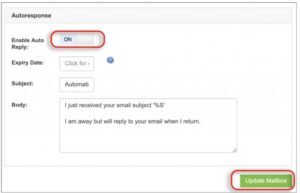
* Click on Update Mailbox at the bottom of the page.
* Your Autoresponder is now active.
* Test it by sending an email to the email address.
* Check if you receive an auto-response back.